
The article analyzes whether specialized lending tools (PowerCurve Strategy Manager - PCSM) or universal rule engines (DecisionRules) are more effective for credit decisioning. While PCSM is a heavy-weighted enterprise solution, DecisionRules offers a lightweight, high-performance alternative that often provides better "bang for less buck" through simplicity and templates.
Key Comparisons
| Feature | PowerCurve Strategy Manager (PCSM) | DecisionRules |
|---|---|---|
| Primary Focus | Specialized enterprise solution for credit risk | Lightweight, universal performance-focused engine |
| No-Code vs. Scripting | 50:50 ratio; heavily reliant on scripting for policy rules | 90:10 ratio; focuses on intuitive, table-based design |
| Lending Rules | Built in objects for scorecards and policy rules / rule sets. | Templates for scorecards, eligibility, risk based pricing and more |
| Customization | Low; limited by built-in rule types or scripting | Full; freedom to design any logic without code |
| Advanced Tech | Built-in Machine Learning and Experian connectors | AI assistant and Business Intelligence API |
Core Advantages & Recommendations
DecisionRules excels in flexibility and efficiency. Its no-code tables and ready-to-use templates allow risk users to manage complex logic—like Risk Based Pricing and A/B testing—without technical bottlenecks.
PCSM remains relevant for large institutions needing specialized deep-tier features like native Experian data integration or built-in Machine Learning.
Verdict: For organizations not requiring the full PowerCurve platform, a universal engine like DecisionRules offers superior speed-to-market and lower licensing costs while maintaining professional-grade credit logic.
When thinking about a rule engine for Lending, one would guess that a specialized tool would always play better music than a universal one. But the opposite is often true - if the universal light-weight rule engine supplements its simplicity and ease of use by ready-to-use templates which cover the common Lending use cases, it can give Risk users more bang for less buck.
Specialized Lending System or a Universal Business Rule Engine?
When building a lending system, the conventional wisdom says: pick the specialized tool. It knows your domain, speaks your language, and comes pre-built for credit risk. But specialization comes at a price. Limited flexibility, expensive licences, and a growing gap between what the tool offers and what your business actually needs. A modern universal rule engine takes a different approach. Fewer built-in rule types, but the freedom to design any decisioning logic your way, without code, at a fraction of the cost.
And, if a company succeeds in covering more business domains by the one technology instead of feeding several specialized tools, the benefits are multiplied
Let’s look at this dilemma in the context of Lending Systems, taking PowerCurve Strategy Manager as an example of the specialized product and DecisionRules as an example of a universal rule engine.
What is PCSM
PowerCurve Strategy Manager (PCSM) is a specialized tool for design of (mainly) credit decisioning processes in financial services, featuring many rule types, including lending-specific scorecards and policy rules sets, and also offering a seamless integration to Experian data sources, executions of R models and some other advanced functionalities including assisted design and machine learning.
It is used either as a standalone application integrated to the Lending system, or as a part of some platform from the PowerCurve family (Originations, Collections, etc.).
What is DecisionRules
DecisionRules is a modern lightweight Business Rule Engine, focused on ease of use and performance, equipped with a few easy to understand rule types and powerful orchestration possibilities that enable users to build complex decisioning logic using their own patterns. The most frequent Lending patterns are included in the form of templates, starting from Scorecards and Eligibility and Policy Rule Sets through Risk Based Pricing and Affordability Calculation to Loan Parameters Calculation and A/B Testing.
Rule Design features comparison
Let’s put aside the obvious differences between these two (PCSM being an enterprise-like specialized solution, typically nested within the whole platform for loan origination and used by larger banks that can afford such type of investment, while DecisionRules being a lightweight performance-focused solution, used by smaller institutions either directly or supplemented by a workflow orchestration) and look at the functional aspects that are crucial for no-code development and maintenance of Credit Decisioning strategies.
General Rule design features
First, let’s have a look at features that are linked to general rule design.
Table 1: Features comparison.
| Feature | PCSM | DecisionRules |
|---|---|---|
| Rules and Rule Design | ||
| No-Code/Low-Code design | ||
| No-Code vs. Scripting | 50:50 | 90:10 |
| Rule Types | 10+ (from general to specialized) | 4 basic general rule types |
| Scripting Functionality | Native Script | JavaScript |
| Built-in functions | Few | Wide range |
| User Functions | as functions | as rules |
| Built-in use case templates | ||
| Customizations in rule design of credit decisioning specific rules | Low (either use the built-in specialized rule types or scripting) | Full |
| Connectors to external services | built-in Experian connectors | general REST API and SQL Database connectors |
| Assisted rule design | based on historical data | AI assistant |
| Machine Learning | ||
| Inputs / Outputs | ||
| Data Dictionary | Global dictionary with 2 layers (Physical and Logical) | Rule level IO model with single layer |
| Missing Values allowed | ||
| Testing by Risk users | ||
| In-App testing | ||
| Testing from outside | only after compilation, integration and deploy | Excel, REST API tool |
| Features for efficient change management | ||
| Rule versioning | ||
| Rule Management via API | ||
| A/B Testing | built-in | template based |
| Monitoring | Partial output based | Audit log based |
| Business Intelligence | Business Intelligence API for connection with BI tools | |
Note: apart from Rule design itself, solutions are usually compared based on variability of deployment and integration models, performance and licensing/pricing levels - in all these categories light-weighted Business Rule Engines typically score much better compared to specialized heavy-weighted tools.
Design of Lending related rules
Now, let’s look closer at how rules, that are typically used in the Lending / Credit Decisioning use cases can be designed:
Table 2: Lending decisioning components comparison.
| Components | PCSM | DecisionRules |
|---|---|---|
| Policy Rules and Sets | Script based Policy Rules, standalone Rule Codes, Decision Sets and Policy Rule Sets, all combined in a Decision Setter. | Table-like rules, adjustable template where codes and decisions can be linked to a rule level or rule set level. |
| Scorecards | Class Sets / Boolean Expressions / Matrices + Scorecard rule. | Table-like scoring variables, expandable templates offering different types of scorecard composition. |
| Segmentations | Easy to use Class Sets and Matrices, scripting in Boolean Expressions. | Easy to use DecisionTables and Decision Trees. |
| Risk Based Pricing | No special rule, custom design needed using Treatment Tables or Value Setters with Trees. | Adjustable template. |
| Affordability | No special rule, custom design needed using Treatment Tables. | Adjustable and expandable template. |
| A/B Testing | Built-in within Trees in nodes. | Template to be placed anywhere in the decisioning flow. |
Policy Rules
In PCSM, a Policy Rule is a true/false scripting expression, with a possibility to refer to other rules, such as Class Sets, Matrices and Boolean Expressions. A complex condition in a rule is created using complex AND/OR expressions. As Policy Rules are typically the most frequent decisioning component, this code-based approach can be a significant disadvantage when the user is not a “bracketing” fan.
The reason codes (Decision Reason Codes) are maintained separately from the Policy Rules as well as Decisions Sets (defining outcomes of the rules). Rules are combined to Policy Rule Sets, which define the set of rules for each of the Decisions, and the Rule Sets are assigned to Decision Setters or Decision Setter trees. All this forms a complex system, flexible in some dimensions, but rigid in others.
In DecisionRules, a library of rules is used as well, typically in the form of no-code Decision Tables. Decision Trees or Decision Flows can also be used as rules - the only condition is following the same output structure pattern. The rules can include one or more reason codes, different outcomes, as well as messages to display to the underwriter.
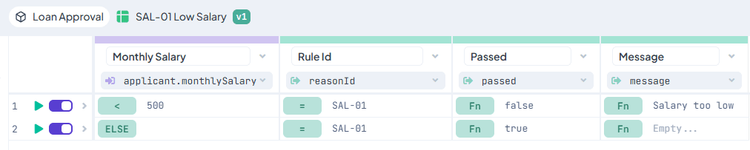
A typical design of a simple rule producing a reason code and a message
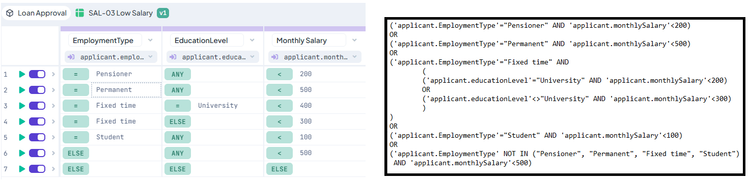
Comparison of more complex conditions definition in a Decision Table (left) as in DecisionRules compared to script (right) as in PCSM
The rules are then combined into Rule Sets using typically Decision Tables again, enabling to specify additional conditions for rules execution..
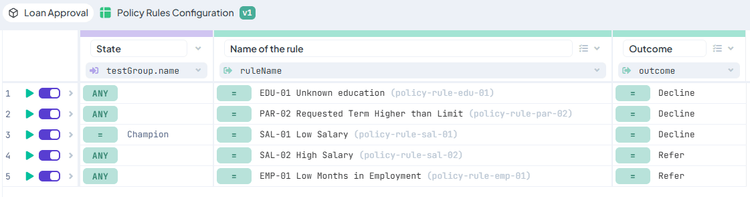
A rule set defining outcomes for each rule - one rule can be used for Decline as well as for Refer, depending on a definition in a rule set
The flexibility of such a system is enormous - the relation between the rule, rule code, message, outcome and assignment to a rule set can be done in many different ways:
- Each rule can bear a single reason code which defines the rule, or can generate different reason codes depending on the conditions defined in the rule (see example below), or the reason code may not even be defined inside the rule but on the rule set level.
- An outcome (Decline, Refer, Verify) can be defined in the rule set (as shown above), directly in the rule (see example below), or can be derived from the reason code if the codes themselves bear the outcome information.
- Each rule can directly contain the message (as shown above), or the messages can be derived from the reason codes in a separate rule.
- The Rule Set can define conditions specifying which rules will be executed (ie. depending on a Test group), or there can be more Rule Sets defined and a suitable one is chosen using a separate rule.

A rule with multiple codes and respective outcome defined in the rule - the rule defines a set of different actions linked to one characteristic
From the options outlined above, each lender can choose whichever suits him best or create his own pattern. In our article we share more details.
Scorecards
In PCSM, a scorecard is based on various rule types such as Class sets, Boolean Expressions and Matrices which make the classing of the variables. These classings are then combined into a Scorecard rule where the score for each leaf is assigned and final score is calculated. This concept is no-code to a big extent (except from Boolean Expressions), the only disadvantage is that each variable has to be handled twice - first the classing and second the score points.
In DecisionRules, the scorecard elements can be various rule types as well, but typically Decision Tables are utilized. A typical pattern is that the Decision Table connects the classing part and the scoring part into one table very intuitively, including the possibility to combine more variables.
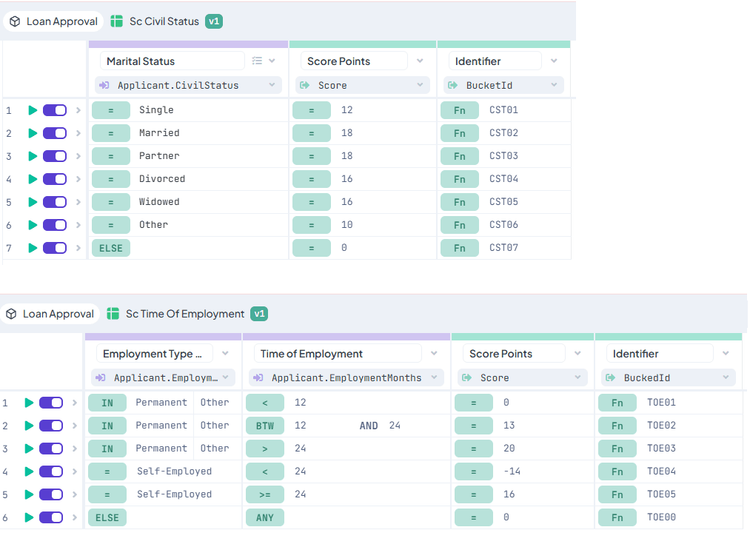
Scorecard variables examples
The scorecard as such can be assembled using different patterns, based on the preference of the user - either the scorecard is defined in a Decision Flow, or again in a Decision Table. In both cases, the final score including potential transformations is calculated in a Decision Flow, optionally supplemented by a Decision Table for assigning a Risk Grade. For more details see article .
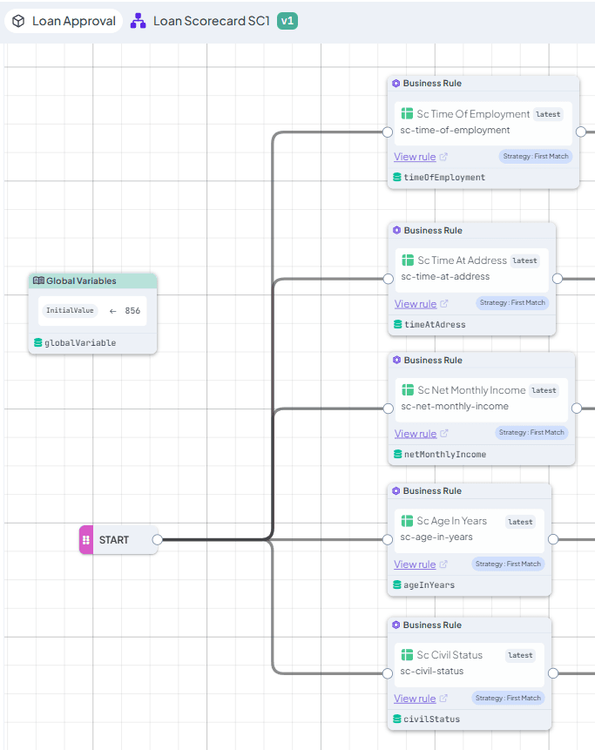
A scorecard defined in Decision Flow
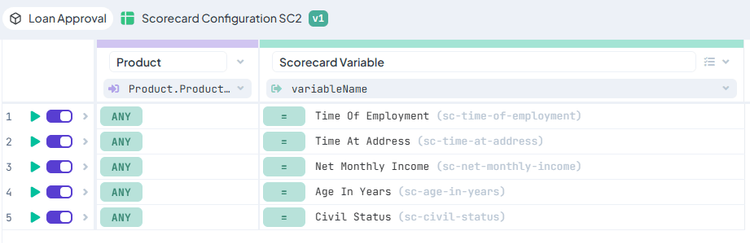
A scorecard defined in Decision Table
As part of the design, detailed audit logging can be applied, including IDs and versions of the rules that were used.
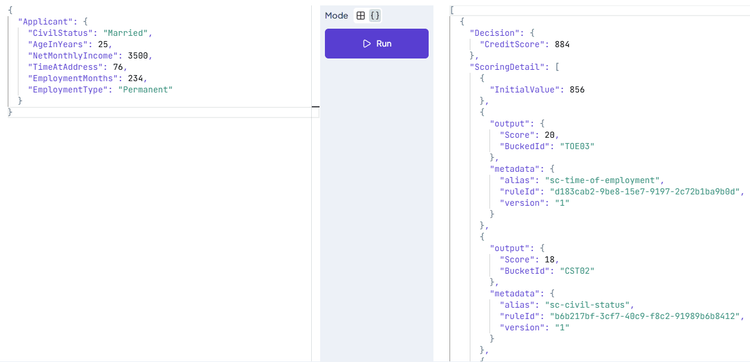
An example of input and part of corresponding output with detailed logs
Segmentations
Possibility to segment applications by various criteria using Class Sets, Matrices and Boolean Expression is a real plus in PCSM. Segmentation over one variable is called Class Set, segmentation over two variables is called a Matrix - both these are no-code. For combining more variables, either a combination of rules is necessary, or a Boolean Expressions can be used which is script based.
These rules are typically used in Trees behind Decision Process Flow nodes to decide on a rule or rule setup applied during the process.
In DecisionRules, a user can use DecisionTables or DecisionTrees for the same purpose, combining any number of variables and using complex conditions without coding, and use these within other rules as well.
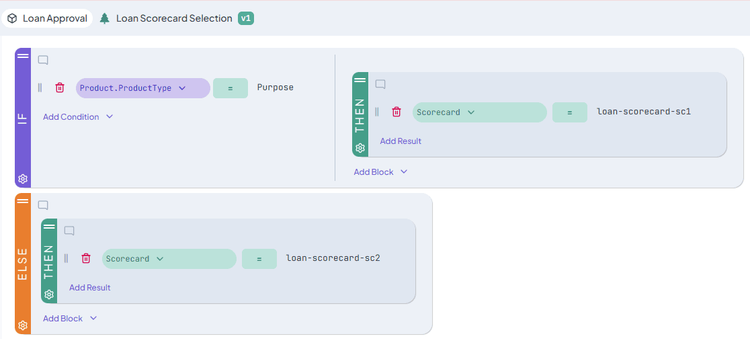
An example of a scorecard selection using a Decision Tree
Risk Based Pricing
PCSM does not have any built-in rule targeting Risk Based Pricing - it can be designed using other rules, such as a Value Setter Tree or a Treatment Table plus Treatment Table Tree.
In DecisionRules, again, you can use a DecisionTable or a DecisionTree, depending on a preference. A template is ready in the application.
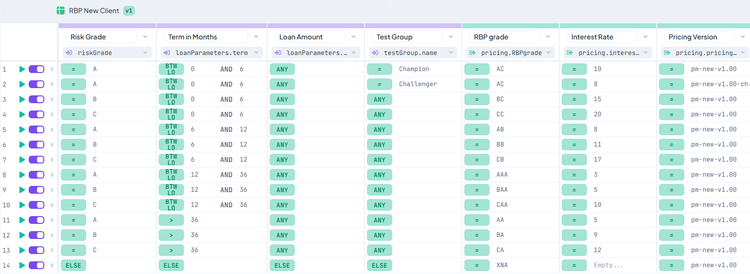
Defining Risk Based Pricing using a Decision Table
Affordability Calculations
Again, no built-in rule in PCSM. A typical design might utilize a Treatment Table for parametrization of the calculation and underlying scripting for the calculations themselves.
In DecisionRules, a template is ready covering the most common case, easy to be extended or modified to fit exactly the company’s needs.
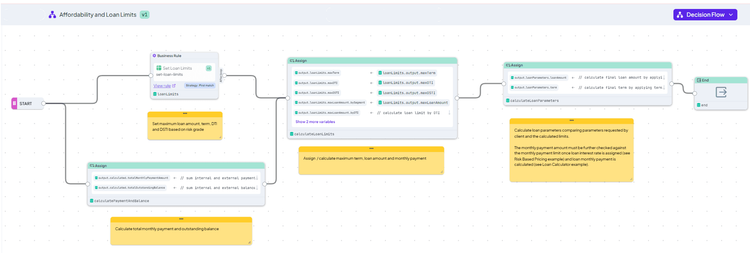
Affordability and Loan Limits template
A/B Testing
This important feature is available in both tools - in PCSM through a built-in functionality that can be used in the Trees, while in
DecisionRules through a customizable template that can be used anywhere in the decision process.
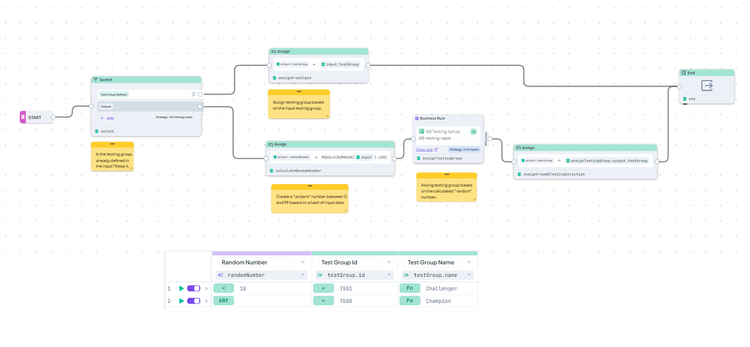
A/B Testing template
Conclusion
Usage of lightweight DecisionRules instead of PCSM makes sense
In this article we compared the rule design capabilities of PCSM and DecisionRules. We demonstrated that specialization does not always mean efficiency and advantage, but often, the other approach is bringing more simplicity and flexibility to the rule design, resulting in efficiency in rule changes.
Although PCSM offers built-in predefined rules for Scorecards and Policy Rule Sets, they are very complex and their customization possibility is in some ways limited. Compared to that, DecisionRules offers different templates that can be used for each of these, or any custom template can be created to directly fit the lender’s needs. Therefore, a Risk user does not have to be afraid of having no clue how to design the lending rules, because the templates are available, as well as a Professional Services team within DecisionRules that is able to give guidance or help with implementation or conversion of rules from PowerCurve.
While PCSM stands out with the on-top functionalities such as Experian connectors, assisted design or machine learning, DecisionRules outperform it in a no-code way of rule design, flexibility and simplicity of basic rules types, as well as templates for the most common Lending decisions and an AI assistant that can help to create rules. So, for a company that does not utilize the whole PowerCurve Originations platform and advanced functionalities, using a lightweight Business Rule Engine such as DecisionRules does make a lot of sense.
Ready to explore what migration looks like for your setup?
Our team, including engineers with hands-on experience in legacy decisioning platforms, can assess your current rule set and propose a conversion plan.

Karel Švec
Business Analyst