Decision Tree
Your logic, visualized as it flows.
A branching, visual way to model complex decisions — no code required. Build IF/THEN paths that mirror how your business actually thinks, and let the engine trace every branch at runtime.
See Your Logic
Replace hard-to-read condition lists with a visual tree that anyone on your team can follow, audit, and edit.
Model Any Complexity
Nest branches as deep as you need. Decision Trees handle multi-level conditions that would be unwieldy in a flat table.
Trace Every Decision in Real Time
Use Debug Mode to watch the engine walk your tree step by step — see exactly which path was taken and why.
Reads like English
Works like an engine
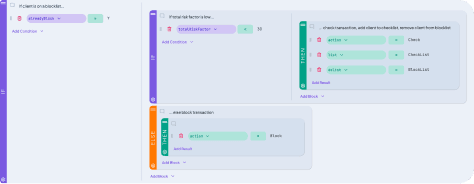
Decision Trees use plain IF / THEN blocks that mirror how your team already talks through decisions. No formulas, no code, no translation layer between what the business means and what the rule does.
- IF / THEN block structure
- Nested conditions to any depth
- Add branches directly in the visual designer
No black boxes
Trace it in seconds
Run a test and watch your tree come alive. Every condition checked, every branch taken — highlighted right in the tree. No guessing, no digging.
- Step-by-step execution path, visualized in the tree
- See which conditions passed or failed
- Test your logic without leaving the editor
Built to connect
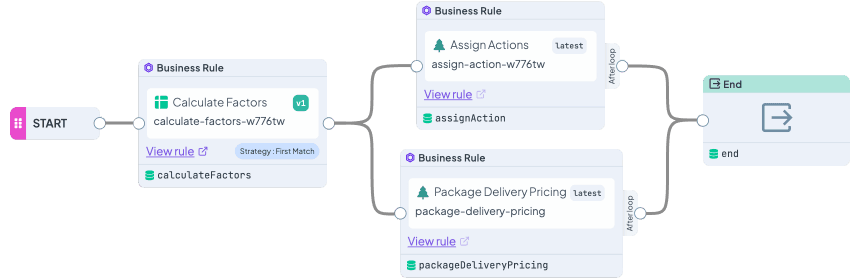
Wire it into a Flow or chain it with other logic. Your Decision Tree connects natively with the rest of your workspace — so your logic doesn't live in isolation, it works as part of something bigger.
- Works with all rule types across your workspace
- Combine with Flows for full automation
- Part of something bigger from day one
Every change tracked
Publish with confidence
Decision Tree versions work exactly like every other rule in your workspace. Roll back to a previous state, and publish with confidence — your logic has the same safety net as your data.
- Full version history
- Roll back to any previous version instantly
- Run one version in staging, another in production
Frequently Asked Questions
Still have questions? We have answers.
Getting Started with
Importing and Exporting Data
Using Decision Trees in Rules
Versioning and Collaboration
Best Practices
Try for Free
Experience Decision Rules at no cost. A credit card is not required for the trial.
Start for freeContact Sales
Have questions? Our sales team is here to help you find the best solution for your business.
contact sales