
Key Takeaway
Centralize Your Data
Replace scattered spreadsheets with a single source of truth directly inside the rule engine
Zero-Latency Queries
Achieve lightning-fast performance (complexity) even with massive datasets, removing network latency
No IT Dependency
Empower business users to update reference data via CSV imports without redeploying the application
Seamless Validation
Integrate Lookups with "Valid Values" to automatically ensure input quality across all your Decision Tables
Reference Data In Business Rules
Every business rules system needs access to reference data. Whether it is pricing tiers, product codes, risk categories, country lists, or valid values for input validation, this data is the backbone of accurate decision-making.
Traditionally, teams have been forced to choose between three imperfect options:
- Excel or Google Sheets: You build a lookup function in a spreadsheet. It’s easy to start, but your team ends up manually exporting, editing, and re-importing files. Every update means manual syncing, and hoping nothing breaks in the process.
- External Databases: You set up a separate database. It works, but it introduces network latency and significant infrastructure overhead. Simple data updates suddenly require IT support and credential management.
- Hardcoded Values: You embed values directly into your rules. It is fast to set up but painful to maintain. Every change requires editing the rule logic, testing, and redeploying the entire lifecycle.
All these approaches force a trade-off, you either sacrifice performance, maintainability, or independence from IT.
Introducing Better Way: The Lookup Tables
Lookup Tables are a new rule type in DecisionRules designed specifically for storing and querying structured reference data. Think of them as the best parts of a spreadsheet, but living directly inside your rules engine, right next to your Decision Tables, Decision Trees, and Flows.
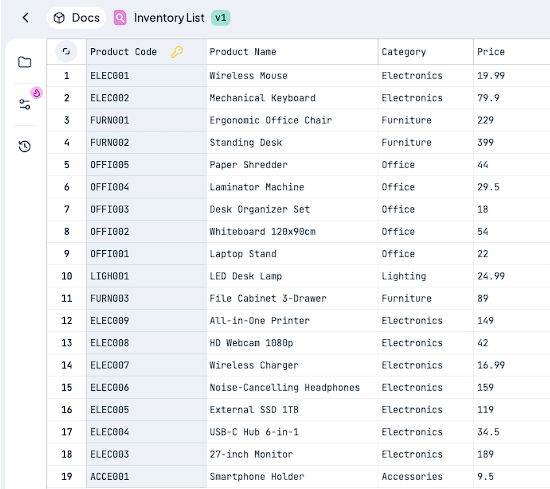
Lookup Table
With the introduction of Lookup Tables, the workflow shifts from manual management to seamless integration:
- No more manual syncing: No more exporting from Google Sheets and importing into your system.
- No more database latency: Data is stored in-memory, ensuring complexity for lightning-fast lookups.
- No more IT bottlenecks: Business users can update pricing, catalogs, or risk scores in seconds via the UI or CSV import without a single line of code or a new deployment.
One place. One update. All your rules automatically use the latest data. Whether you are managing thousands of SKUs or complex regional tax rates, Lookup Tables provide a centralized "Source of Truth" that scales with your business needs.
From Data to Decisions
Implementing Lookup Tables into your workflow is a straightforward process designed to bridge the gap between data management and rule execution. The system follows a simple three-step model:
1. Define Your Structure
Everything starts in the Lookup Table Designer. You define your columns and designate a Primary Key. This key is the unique identifier (like a SKU or Customer ID) that allows the engine to find the exact row you need in constant time).
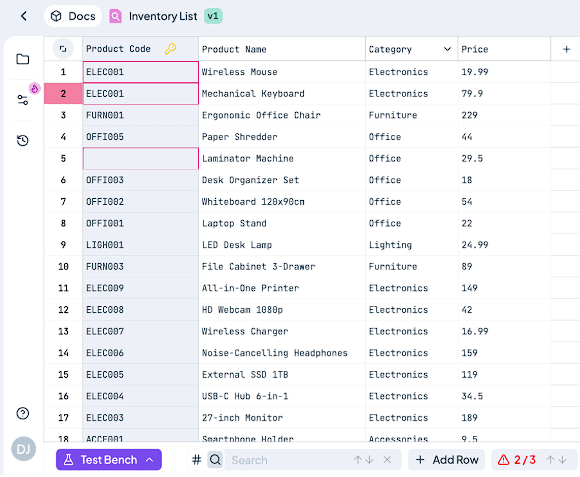
Define Your Structure
2. Populate Your Data
You can enter data manually in our intuitive UI using copy and paste, or use the robust CSV import. The designer includes built-in validation that catches duplicate primary keys or empty values before you save, ensuring your rules never run on corrupted data.
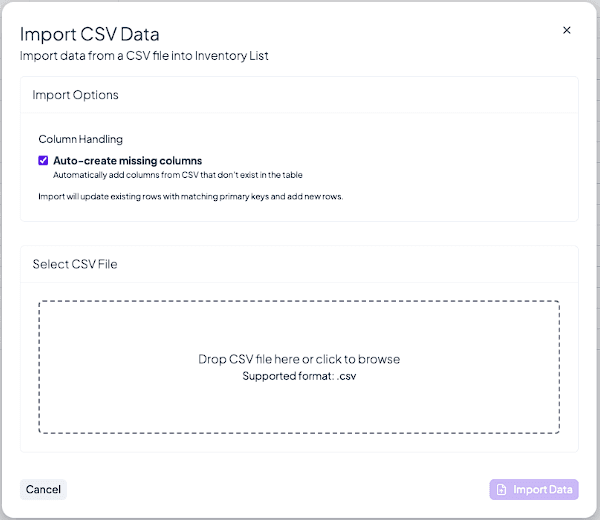
Populate Your Data
3. Query from Any Rule
Once your table is ready, you can access it from any Decision Table, Tree, or Flow using simple, built-in functions:
- LOOKUP_VALUE("table-alias", "key", "column"): Fetches a specific value.
- LOOKUP_EXISTS("table-alias", "key"): Returns a boolean to check if a record exists.
For example, a Decision Table can dynamically fetch a unitPrice based on an input.sku with a single line of logic, keeping the table itself clean and focused only on the business strategy, not the data storage.
When to Use Lookup Tables
Lookup Tables are versatile tools that can be applied across various industries and departments. If your data changes periodically but not constantly, and it needs to be managed by business users without IT involvement, Lookup Tables are the perfect fit.
Here are the most common ways customers are using them:
- Dynamic Pricing & Discounts: Store thousands of SKUs with their corresponding unit prices, discount tiers, and seasonal markups. Your rules simply fetch the current price based on the product ID.
- Geographic Configuration: Manage tax rates, shipping zones, and currency mappings by country or postal code. When a tax rate changes, you update the Lookup Table once, and all your shipping rules are instantly updated.
- Risk & Compliance Management: Store risk scores for different customer segments or regulatory codes for various jurisdictions. This keeps your main decision logic clean and easy to audit.
- Input Validation (Valid Values): Use a Lookup Table as a source for "Valid Values" in your Decision Table columns. This ensures that users can only select existing products or approved regions, drastically reducing data entry errors.
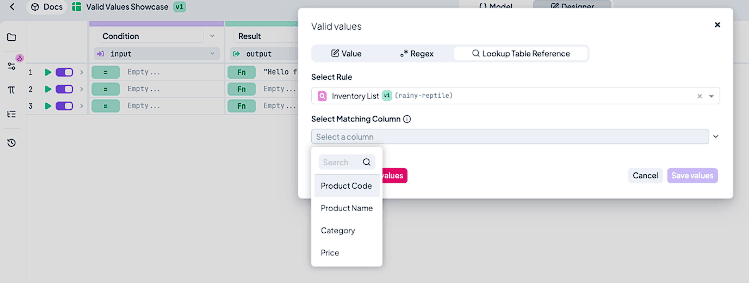
Input Validation (Valid Values)
Pro Tip: If your data fits in a spreadsheet and doesn't require real-time synchronization with a complex external system, a Lookup Table is almost always the simpler, faster choice compared to a database connector.
Lookup Tables vs. Database Connectors: Choosing the Right Tool
While DecisionRules supports direct database connections, Lookup Tables offer a specialized alternative for specific data types. Understanding the difference is key to maintaining a high-performance system.
| Feature | Lookup Table | Database Connectors |
|---|---|---|
| Data Type | Simple, structured reference data | Complex queries, joins, and transactions |
| Performance | Ultra-fast (In-memory) | Subject to network & database latency |
| Management | Business users via UI/CSV | IT & Database Administrators |
| Infrastructure | Zero (Built-in to DecisionRules) | Requires external setup & credentials |
| Updates | Instant (No redeployment needed) | Real-time sync with external systems |
Rule of Thumb: If your data fits in a spreadsheet and doesn't require real-time synchronization with complex external systems, Lookup Tables are the faster and simpler choice. Use Database Connectors only when you need to query live, transactional data that resides in a massive enterprise ecosystem.
One Change. One Place. Every Rule Updated.
The introduction of Lookup Tables marks a significant milestone in making DecisionRules more flexible and user-friendly. By centralizing your reference data, you eliminate the risks associated with scattered Excel files, reduce the technical debt of hardcoded values, and significantly boost the performance of your decision-making processes.
Ready to stop managing spreadsheets and start managing logic? Log in to your DecisionRules account today and create your first Lookup Table.

Petr Lev
CTO of DecisionRules